Stream Your Video
and Songs File in Coreplayer Just Copy Any Video Downloding Link And
Then Open Coreplaye And Go Option And Click OPEN URL
And Past Ur Link then Write And Press ok And Select Mobile Ofice Watch
or Listen song example.....after copy by opera Delet space in link if
have..
Sunday, September 2, 2012

Rapidshare Nd Megaupload Primium Downloader
Visit This Site To Generate Resumable Download Links Of Files Hosted At Repid Share & Megaupload
http://rapidshare.megapid.com
http://rapidshare.megapid.com
Download Youtube Videos Easyly With SS Tricky Mathed
Hello Guys Here Im Telling You A Easyest Youtube Videos Downloading Mathod
In This MathoD We Have To Remove (www.) From The Video Url nd At The Place Of www. We Have To Add ss
For Example :
This Is Simple Url :
http://www.youtube.com/watch?v=MC9uLW_Vznk
Now What We Have To Change IN Given url :
http://SSyoutube.com/watch?v=MC9uLW_Vznk
After Putting SS At The Place Of www. Just Press Enter Nd Enjoy Downloading
In This MathoD We Have To Remove (www.) From The Video Url nd At The Place Of www. We Have To Add ss
For Example :
This Is Simple Url :
http://www.youtube.com/watch?v=MC9uLW_Vznk
Now What We Have To Change IN Given url :
http://SSyoutube.com/watch?v=MC9uLW_Vznk
After Putting SS At The Place Of www. Just Press Enter Nd Enjoy Downloading
Remove facebook Time Line Option
HERE IM GOING TO SHARE 2 METHODS TO REMOVING FACEBOOK TIME LINE
Method 1 ->
Step 1: Login to your Facebook or go to facebook Developers page.
Step 2: Now you see the same screen you saw when you were activating your Facebook Timeline but this time you will click “Edit App” instead of “Create New App”

Step 3: After clicking Edit App you will see the same app you build when you enabled Facebook Timeline
.
Step 4: On bottom left of your screen there will be an option to “Delete App” click that
.

Step 5: Facebook will now confirm whether you really want to delete this app or not, click Confirm.

Step 6: After clicking Confirm you will get a confirmation pop-up that your app has successfully been deleted, click “Ok”

Step 7: And that was it, you just disabled Facebook Timeline, go back to your profile and you will see your old Facebook Profile.
method -2
This trick is only available for Firefox users.
Install User Agent Switcher.
Restart your browser.
Goto Tools- Default User Agent-Internet Explorer- Internet Explorer 7

Refresh your Facebook page, now you can see your old profile.This happens because IE7 doesn't support Timeline.
Method 1 ->
Step 1: Login to your Facebook or go to facebook Developers page.
Step 2: Now you see the same screen you saw when you were activating your Facebook Timeline but this time you will click “Edit App” instead of “Create New App”
Step 3: After clicking Edit App you will see the same app you build when you enabled Facebook Timeline
.
Step 4: On bottom left of your screen there will be an option to “Delete App” click that
.
Step 5: Facebook will now confirm whether you really want to delete this app or not, click Confirm.
Step 6: After clicking Confirm you will get a confirmation pop-up that your app has successfully been deleted, click “Ok”
Step 7: And that was it, you just disabled Facebook Timeline, go back to your profile and you will see your old Facebook Profile.
method -2
This trick is only available for Firefox users.
Install User Agent Switcher.
Restart your browser.
Goto Tools- Default User Agent-Internet Explorer- Internet Explorer 7
Refresh your Facebook page, now you can see your old profile.This happens because IE7 doesn't support Timeline.
Create Your Avatar
Seeing your face as a cartoon would have been one
of your life time dreams. Now here is an awesome cool web application
that does what you want to do. Seeing your faces as cartoons (manga)
will be super easy with this application. Face Your Manga
is an web application that enables you to create your Mangatar (Manga +
Avatar). It is an easy application using which you edit the facial
characteristics of a default template face, so that it looks much Like
You
.
HERE WE GOOO
1. VISIT HERE
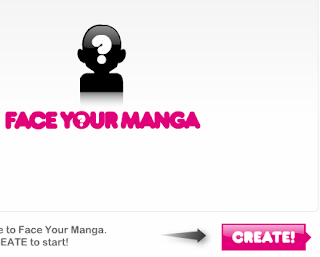
2.Click the create button given below
3. Select your Gender
4. After the flash application loads, you can edit the facial characteristics of the default face, so that it look like yours.
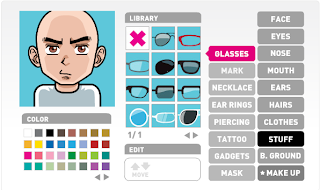
5. After editing the face, click Finish and click OK in the Popup.

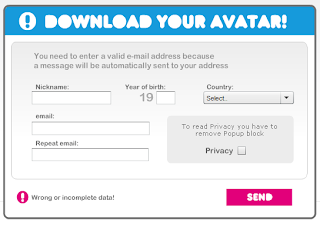
6. Enter your email address, nickname and year of birth, Your Country and tick the privacy policy check box and click 'Send'
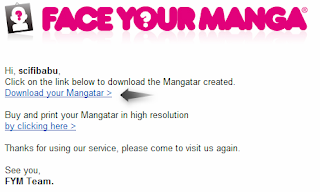
7. Your Cartoon Avatar (Mangatar) would be sent as an link to the email address specified.
.
HERE WE GOOO
1. VISIT HERE
2.Click the create button given below
3. Select your Gender
4. After the flash application loads, you can edit the facial characteristics of the default face, so that it look like yours.
5. After editing the face, click Finish and click OK in the Popup.
6. Enter your email address, nickname and year of birth, Your Country and tick the privacy policy check box and click 'Send'
7. Your Cartoon Avatar (Mangatar) would be sent as an link to the email address specified.
Use Facebook On Your Mobile Without Internet
Want to know how can you use facebook on your mobile without even a Internet Connection ! I'll tell you :D Just Dial *325# on your phone and Follow the Instructions ->

Run Opera Mini In Safe Mode Trick By VIVEK
TRICK To Run The Opera Mini In Safe Mode
Hi GuysYes You Heard Right.
You Can Run Your Opera Mini In Safe Mode.
Just Click On The Opera-mini Icon To Launch The Application.
When White Launch Screen Of Opera-mini Came
Just Press And Hold “5″. Until Opera Start.
Then you see Message “YOUR OPERAMINI RUNNING IN SAFE MODE”
I Checked It With Opera-mini 6 or 4.2 .What Is Changes
Hi GuysYes You Heard Right.
You Can Run Your Opera Mini In Safe Mode.
Just Click On The Opera-mini Icon To Launch The Application.
When White Launch Screen Of Opera-mini Came
Just Press And Hold “5″. Until Opera Start.
Then you see Message “YOUR OPERAMINI RUNNING IN SAFE MODE”
I Checked It With Opera-mini 6 or 4.2 .What Is Changes
Subscribe to:
Posts (Atom)